

The best smart thermostat is the one that suits both your heating system and the way your household lives. A busy family might value easy voice control more than an elaborate display. Someone working from home may care most about a predictable schedule. Neither benefit matters if the thermostat cannot control the equipment behind the wall.
For 2026, the ecobee Smart Thermostat Premium is our overall recommendation for its combination of thermostat functions, included SmartSensor, air quality monitoring, and broad voice-platform support. There are good reasons to spend less, though, particularly when you mainly want Wi-Fi control or already use Alexa throughout your home.
This research-based guide weighs documented product features, relative cost, installation considerations, and practical household needs. Manufacturer instructions and independent energy guidance inform the advice. The recommendations describe which features justify each choice, with compatibility checks taking priority over brand preference.
Our Smart Thermostat Picks
Start with Premium for the fullest feature package, Essential for flexible voice control at a lower cost, or Nest for a Google-focused programmable option. Amazon’s thermostat is the natural shortlist choice for Alexa and Ring households. Enhanced adds another ecobee option to compare, while Sensi Lite and the ST55 suit buyers planning a modest connected-home upgrade.
The right choice within that shortlist depends on the installation. Check the wiring first, then compare the features below against the tasks your household actually wants to perform.
Best Overall: ecobee Smart Thermostat Premium
The Premium earns its place because it brings several useful functions together. The selected package combines a Wi-Fi thermostat with a SmartSensor and an air quality monitor, while supporting Alexa, Siri, and Google Home. Built-in Alexa adds another way to interact with the device. It is the strongest starting point for a homeowner who wants temperature control to be part of a broader connected-home setup.
Why it deserves the upgrade
Think about where the thermostat sits. A hallway may be a convenient mounting location without representing the room where you spend the evening. That makes the included SmartSensor worth examining before dismissing the Premium as an expensive wall control. Check how the sensor participates in temperature settings and which placement the manufacturer recommends for your home.
The air quality monitor is a separate reason to consider this model. It may appeal to someone who wants environmental information alongside temperature control, without adding another display to the wall. Treat that information according to the manufacturer’s guidance. The presence of a monitor does not establish the condition of every room or replace appropriate dedicated alarms.
The Premium also supports a live view from an ecobee doorbell. For an existing ecobee household, that can make the thermostat more useful in daily life. It is an ecosystem benefit, so consider it in the context of equipment you already have rather than a reason to purchase several additional devices at once.
Who gets the most from it
This is our pick for households with different preferences about how to control the temperature. Someone may use Alexa while another person prefers a phone or another supported platform. Broad compatibility gives you options, although each assistant can have its own account, hub, or setup requirements. Confirm those requirements before assuming every advertised function works immediately out of the box.
The package is also appealing when you can name a practical use for both the SmartSensor and the environmental monitoring. Those features make the extra spending easier to justify than an upgrade based mainly on appearance or the word “premium.”
Reasons to choose something simpler
Start with Essential if programmable Wi-Fi control and voice compatibility cover your needs. A household that already has preferred speakers and environmental monitors may get less value from this model’s additional functions. Likewise, installing a feature-rich thermostat will not resolve an equipment compatibility problem.
What stands out: The combination of the SmartSensor, air quality monitoring, and several supported voice platforms gives this recommendation the broadest feature appeal.
What needs thought: Several functions overlap with other smart-home devices. Decide which ones you will actually use, and verify equipment compatibility before paying for the fuller package.

Pros
- Comprehensive air quality monitoring with actionable alerts
- Includes $50 SmartSensor for multi-room temperature balancing
- Integrated doorbell camera viewing saves trips to your phone
- Built-in radar sensor learns routines for automatic comfort adjustments
- Works with 95% of HVAC systems and includes 3-year warranty
Cons
- Premium price point at $238.95 compared to basic smart thermostats
- Smoke alarm detection and some features require paid ecobee Smart Security subscription
- Large 4.09-inch display may not fit all existing thermostat cutouts without the included trim kit
The ecobee Premium does more than control temperature. It monitors the air you breathe, shows you who is at the front door, and adjusts comfort room by room based on where your family actually spends time. The included SmartSensor means your bedroom stays cool at night while the empty living room does not waste energy.
The metal-finished display looks elegant on any wall, and the built-in Alexa or Siri integration means you can ask it to play music, set timers, or control lights without reaching for your phone. Air quality alerts help you stay ahead of stuffiness or allergens, and the furnace filter reminders take the guesswork out of maintenance.
If you want a thermostat that saves energy, improves air quality, and integrates your doorbell without juggling multiple apps, this one delivers.
Styles it works with: Modern, Contemporary, Minimalist, Smart Home Aesthetic
Best placed in: Main hallway for central control, kitchen wall for high-traffic visibility, master bedroom for private climate adjustments
May not suit: Homes with very small or recessed thermostat cutouts without using the included trim kit, renters who cannot modify HVAC wiring, households wanting a completely subscription-free smart home setup for advanced features like smoke alarm detection
Buy it if:
- You have an ecobee doorbell camera or plan to add one for integrated front-door monitoring
- Air quality matters to you and you want real-time indoor monitoring with actionable alerts
- You experience uneven heating or cooling across rooms and want sensor-based balancing
- You want voice control, music streaming, and climate management in one sleek device
Consider waiting if:
- You are planning a major HVAC system upgrade in the next six months
- You prefer to compare pricing during seasonal sales events
Skip it if:
- You need a basic programmable thermostat without smart features or app control
- Your HVAC system is not compatible with smart thermostats (check ecobee.com/compatibility first)
Check the latest price and availability on Amazon before it sells out.
Best Value for Mixed Voice Platforms: ecobee Essential
The ecobee Smart Thermostat Essential is the more restrained choice for a household that wants programmable Wi-Fi temperature control and several voice-assistant options. Its documented support includes Siri, Alexa, and Google Assistant, and the selected model is ENERGY STAR certified. That combination makes it a sensible value recommendation without relying on a promise of a particular reduction in bills.
Why the features make sense
A thermostat does not need to become the center of your smart home to be worthwhile. If the goal is to manage a regular heating and cooling routine, programming and connectivity deserve more attention than extra entertainment or monitoring features. Essential puts those everyday priorities at the center of the purchase.
The voice-platform flexibility is especially useful when you have not committed the whole household to one system. Perhaps one room uses an Alexa speaker while someone else prefers Google Assistant. Check the integration instructions for the exact functions you want, but supporting several platforms gives this thermostat a broader starting point than an Alexa-focused choice.
ENERGY STAR certification is relevant evidence, too. The program explains that certified smart thermostats demonstrate energy savings using real-world data. That supports looking for certification while shopping; it does not tell you how much this particular installation will save. Your schedule and previous thermostat settings still matter.
Who should put it first
Essential belongs near the top of the list for buyers who want a clear set of core functions and enough integration flexibility to accommodate different users. It also suits someone comparing ecobee models who can identify no pressing need for the Premium package’s included extras.
Before choosing, write down three tasks you expect to perform: changing the temperature, managing your routine, and using your preferred assistant, for example. Then check the instructions for those tasks. A feature that is straightforward for the people in your home is more valuable than a longer list of capabilities you rarely open.
When to look elsewhere
Choose the Premium package when its additional documented features are central to your plan. Choose Amazon’s thermostat when Alexa and Ring are already your clear preference and its installation requirements fit. Essential makes the strongest case when you want flexibility without buying the most elaborate package.
Strength: Programmable Wi-Fi control and support for three major voice assistants.
Tradeoff: Make the comparison around the features you need; the Essential name does not by itself establish what accessories or advanced controls your installation supports.

Pros
- Easy DIY installation with optional Power Extender Kit for homes without C-wire
- Compatible with 85% of HVAC systems including gas, electric, heat pump, and boilers
- Automatic schedule adjustments save energy when you are away
- Indoor humidity detection helps maintain comfortable air quality
- Expandable with SmartSensors for room-by-room temperature monitoring
Cons
- No reviews yet to confirm real-world performance and reliability
- SmartSensors and Power Extender Kit sold separately add to total cost
- Requires 24 VAC HVAC system, limiting compatibility with some older equipment
The ecobee Smart Thermostat Essential takes the guesswork out of managing your home's temperature while putting money back in your pocket. It learns your schedule and automatically adjusts heating and cooling so you are not wasting energy when no one is home, yet your space is perfectly comfortable when you walk in the door. The sleek touchscreen looks sharp on any wall, and controlling it from your phone means you can make adjustments from bed, the office, or on vacation.
What sets this apart from basic programmable thermostats is the smart home integration. Ask Alexa to lower the temperature while cooking dinner, tell Google to warm up the house before you get home, or use Siri through HomeKit when your hands are full. The eco+ features work quietly in the background, shifting energy use to off-peak hours and monitoring humidity so your home feels better without manual tweaking.
If you want serious energy savings and modern smart home control without paying for premium features you may never use, this one delivers.
Styles it works with: Modern, Minimalist, Contemporary, Scandinavian
Best placed in: Hallway wall near living areas, main floor thermostat location, central home position for accurate temperature reading
May not suit: Homes with HVAC systems older than 24 VAC standard, renters who cannot modify thermostat wiring, spaces where a premium multi-sensor system is needed for uneven heating zones
Buy it if:
- You want to cut your energy bills without sacrificing comfort
- You already use Alexa, Google Assistant, or Apple HomeKit and want voice control over temperature
- You are looking for a smart thermostat that is easy to install yourself
- You want to monitor and adjust your home temperature remotely from your phone
Consider waiting if:
- You want to see customer reviews and real-world feedback before purchasing
- You are waiting for a sale or bundle deal that includes SmartSensors
Skip it if:
- Your HVAC system is not compatible with 24 VAC thermostats
- You need advanced zoning with multiple room sensors included in the base price
- You prefer a thermostat with physical buttons instead of a touchscreen
Check the latest price and availability on Amazon before it sells out.
Best for Straightforward Google Scheduling: Google Nest Thermostat
The Google Nest Thermostat in Snow is a good candidate for someone who wants a programmable Wi-Fi thermostat and prefers Google’s approach to connected-home control. This recommendation is for the standard Nest Thermostat. Check the full model name when shopping, because information about other Nest generations may describe different hardware and functions.
Why it belongs on the shortlist
A planned schedule can be a better fit than an elaborate automation scheme. If you know when the household wakes up, leaves, and returns, start by deciding what temperatures you actually want during those periods. A programmable thermostat gives that routine somewhere to live, with Wi-Fi connectivity adding convenience to the purchase.
For a Google-centered household, choosing a Google device may also reduce the number of separate systems you need to learn. That is a reason to investigate the Nest interface and setup process, rather than evidence that it is automatically the right choice for every home with a Google speaker.
The selected finish is Snow. Choose the finish you prefer, but keep technical comparisons tied to the model. A darker or warmer color of this same thermostat should not be treated as an upgrade in heating performance.
The compatibility check matters here
Google provides a Nest thermostat compatibility guide and an online checking process. Its guidance distinguishes supported low-voltage systems from incompatible high-voltage equipment and notes that some installations need a C-wire or a suitable power connector. Complete that check before purchasing rather than assuming Wi-Fi capability says anything about your furnace wiring.
Who should choose it
Put this model first if you want Google’s standard programmable thermostat and are comfortable choosing a routine deliberately. It is also a reasonable alternative to buying a more elaborate package whose additional functions would see little use.
Look elsewhere if a specific accessory, learning feature, or equipment control is essential and you have not confirmed it for this model. The Nest name covers more than one product; similarities in branding are not a substitute for checking the exact specification.
Strength: A focused programmable Wi-Fi option for shoppers who prefer Google.
Tradeoff: Model identification and the compatibility check deserve careful attention, especially when comparing it with a Nest Learning Thermostat.

Pros
- Auto-away feature prevents heating or cooling empty rooms
- Savings Finder suggests schedule tweaks to reduce energy costs
- Clean minimalist design fits modern and transitional interiors
- HVAC monitoring provides maintenance reminders and system alerts
- Voice control works across multiple smart home platforms
Cons
- Requires C-wire or power adapter for heat pump and zone-controlled systems
- No reviews yet to verify real-world reliability and customer satisfaction
- Limited color options compared to previous Nest models
The Google Nest Thermostat takes the guesswork out of home temperature management with genuinely smart automation. It learns when you leave and returns, adjusting the temperature so you are not paying to heat or cool an empty house. The clean snow white finish disappears into any wall color, and the mirrored display only lights up when you walk by.
What sets this apart is the HVAC monitoring that watches your heating and cooling systems for problems. You get alerts if something seems off, plus reminders when it is time for filter changes or seasonal maintenance. For households juggling busy schedules, the phone app lets anyone adjust the temperature without walking to the hallway, and voice control through Google Assistant or Alexa adds another layer of convenience.
If you want lower energy bills and proactive system monitoring without hiring an HVAC tech for installation, this one delivers.
Styles it works with: Modern, Scandinavian, Minimalist, Contemporary Farmhouse
Best placed in: Main hallway near bedroom wing, central living area wall, open-concept kitchen entry
May not suit: Homes with heat pump or zone-controlled systems without existing C-wire, renters who cannot modify electrical wiring, households wanting a thermostat with physical temperature display at all times
Buy it if:
- You want automated energy savings without manual schedule programming
- Your household has unpredictable routines and you need remote temperature control
- You have compatible wiring or simple forced-air heating and central AC
Consider waiting if:
- You want to see verified customer reviews before committing to a new smart home device
Skip it if:
- You have a heat pump, zone-controlled, or heating-only system without C-wire and cannot install a power adapter
- You prefer a thermostat with always-on temperature display instead of proximity-activated screen
Check the latest price and availability on Amazon before it sells out.
Best for Alexa and Ring Households: Amazon Smart Thermostat
Amazon Smart Thermostat is the clearest fit for a home already organized around Alexa and Ring. Those are the supported integrations identified for this selection, and they explain its place here more usefully than a general claim that every home needs the most advanced thermostat available.
Why it is a practical budget choice
A familiar smart-home platform can reduce friction. If the household already uses Alexa for everyday requests, temperature control can become another task within that routine. This model is especially worth comparing when you want to add connected heating and cooling control while keeping the purchase modest.
The installation requirement is explicit: a C-wire is required. Check for a suitable connection before deciding that the low purchase cost makes this the cheapest overall option. If your installation needs electrical work or a manufacturer-approved power solution, include that in the comparison.
Who should buy it
Choose it when Alexa or Ring compatibility is a priority and the wiring checks out. It is a focused recommendation for someone who already knows which ecosystem they want to use.
If Siri or Google Assistant support is essential, start with a candidate that explicitly documents that support. There is little value in saving on the thermostat and then discovering that the household’s preferred control method has not been confirmed.
Strength: A clear match for an existing Alexa and Ring setup.
Tradeoff: The C-wire requirement can change the installation plan and total expense.

Pros
- Significantly cheaper than Nest or Ecobee while offering similar smart features
- Deep integration with Alexa ecosystem for voice control and routines
- Works with Ring and Echo devices to create multi-room temperature zones
- Built on proven Honeywell thermostat technology for reliability
Cons
- Requires C-wire installation, not compatible with all older heating systems
- No reviews yet, so real-world performance and reliability are unproven
- Limited to Amazon ecosystem, no Google Home or Apple HomeKit support
The Amazon Smart Thermostat brings intelligent climate control to your home without the premium price tag of competitors. It learns your schedule and adjusts temperatures automatically, so you walk into a comfortable home without thinking about it. The ability to create comfort zones using Echo devices means your bedroom can be cooler at night while the living room stays warmer during the day.
What sets it apart is how naturally it fits into an Alexa-powered home. Ask Alexa to adjust the temperature while cooking dinner, set routines that lower the heat when everyone leaves, or check your thermostat from the grocery store. The Honeywell technology inside provides peace of mind that this is not a gamble on untested hardware.
If you want automated energy savings and whole-home temperature control without spending over $200 on a Nest, this one delivers.
Styles it works with: Modern Minimalist, Contemporary, Smart Home Aesthetic, Tech-Forward Spaces
Best placed in: Hallway thermostat location (replacing existing unit), main floor control point, central living area wall
May not suit: Homes without C-wire compatibility in existing thermostat wiring, households that prefer physical button controls over app-based adjustments, or homes not using Alexa as primary smart assistant
Buy it if:
- You already use Alexa and Echo devices throughout your home
- Your current thermostat location has C-wire compatibility
- You want to reduce energy bills with automated temperature scheduling
- You need multi-room climate control using existing Echo speakers
Consider waiting if:
- You want to see verified customer reviews before purchasing
- You are unsure about C-wire compatibility and need professional assessment first
Skip it if:
- You do not have C-wire and are not willing to hire an electrician to install one
- You use Google Home or Apple HomeKit as your primary smart home platform
Check the latest price and availability on Amazon before it sells out.
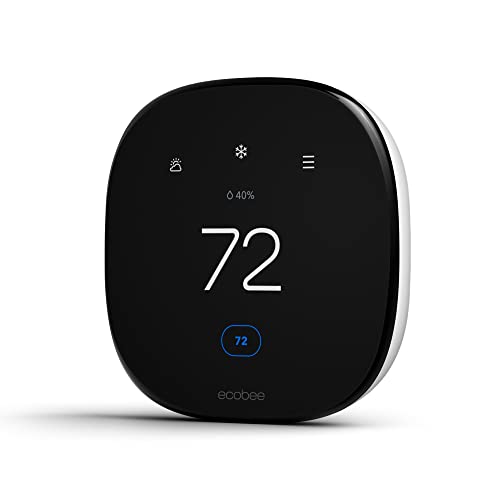
Best Step-Up ecobee Option: ecobee Smart Thermostat Enhanced
The ecobee Smart Thermostat Enhanced belongs between the simplest purchase and the fullest package on your comparison list. The selected model offers programmable Wi-Fi control, ENERGY STAR certification, and support for Siri, Alexa, and Google Assistant. It is worth considering when you prefer ecobee and want to investigate an upgrade without immediately choosing Premium.
Make the upgrade specific
Start with the job you want the thermostat to do. Perhaps you need convenient programming and several supported voice platforms, but you are still deciding which ecobee model offers the most useful controls for your equipment. Enhanced gives you another option to compare on those practical grounds.
The shared assistant support is useful for a household with mixed preferences. It can also matter when replacing a thermostat in a home where other connected devices are already established. Check the exact integration path rather than assuming that every voice platform exposes every thermostat setting.
Who should consider it
This model is a sensible shortlist addition for a buyer committed to ecobee who is willing to compare its models carefully. Read the feature comparison alongside the compatibility result, then decide whether the additional capabilities matter enough for your routine.
The product name alone should not settle that decision. If the functions you need are already covered by Essential, that is a strong reason to keep spending down. If you specifically want the Premium package’s documented SmartSensor and air quality monitor, compare that package directly instead.
Strength: Programmable Wi-Fi operation, certification, and several voice-platform choices in another ecobee option.
Tradeoff: An upgrade needs a concrete purpose. Identify the function you are paying for before choosing Enhanced over Essential.
Pros
- Built-in occupancy sensing eliminates need for separate room sensors initially
- Compatible with 90% of HVAC systems and includes Power Extender Kit for no-C-wire homes
- Intuitive ecobee app makes monitoring energy use and adjusting settings simple
- Works with all major smart home ecosystems for flexible automation
- Eco+ feature optimizes efficiency based on weather, routine, and grid activity
Cons
- No customer reviews yet to verify real-world energy savings and reliability
- SmartSensors for multi-room temperature balancing sold separately, adding to total cost
- Requires stable WiFi connection for remote access and smart features to function
The ecobee Smart Thermostat Enhanced takes the guesswork out of home climate control. Instead of manually programming schedules or constantly adjusting settings, it learns when you're home, when you're away, and what temperatures keep you comfortable. The built-in occupancy sensor means it starts working intelligently right out of the box, preheating or precooling before you arrive and automatically scaling back when rooms are empty.
What sets this apart is how it balances automation with control. The ecobee app gives you a clear view of your energy use, system activity, and schedule from anywhere. You can override settings anytime, create vacation schedules, or let the eco+ feature handle optimization based on local weather and your household patterns. It integrates cleanly into existing smart home setups, whether you use Alexa, Google, or Apple HomeKit.
If you want proven energy savings and consistent comfort without constantly thinking about your thermostat, this one delivers.
Styles it works with: Modern, Contemporary, Minimalist, Smart Home Aesthetic
Best placed in: Central hallway wall, main living area, stairway landing where it can detect household activity
May not suit: Homes with complex multi-zone HVAC systems requiring multiple thermostats; spaces where WiFi signal is weak or unreliable; renters who cannot modify existing thermostat wiring
Buy it if:
- You want to lower heating and cooling bills without sacrificing comfort
- Your schedule varies and you forget to adjust the thermostat when leaving home
- You already use Alexa, Google Assistant, or Apple HomeKit and want voice control
- You're looking for a thermostat that works out of the box without needing extra sensors immediately
Consider waiting if:
- You want to see more verified customer reviews before committing at this price point
- You need multi-room temperature balancing and want to budget for SmartSensors at the same time
Skip it if:
- You have an incompatible HVAC system (check ecobee's compatibility tool first)
- You don't have reliable WiFi or aren't interested in app-based control
- You prefer a simpler programmable thermostat without smart features
Check the latest price and availability on Amazon before it sells out.
Best Budget Starting Point: Sensi Lite ST25
Sensi Lite ST25 is an approachable candidate for a first smart-thermostat purchase. The selected model identifies Wi-Fi connectivity, Alexa support, DIY installation positioning, and ENERGY STAR certification. Those are useful foundations for a buyer who wants a connected thermostat without making the purchase a wider smart-home project.
Why it is worth considering
Begin with a small goal: make temperature control easier to manage in your actual routine. For someone interested in Alexa and Wi-Fi, the Lite has a clear reason to be on the shortlist. There is no need to value every extra feature found on a more expensive thermostat if the household is unlikely to use it.
Its certification is another useful comparison point, but keep expectations realistic. Certification provides evidence about a product’s energy-saving credentials, while your own result depends on how the heating and cooling system is operated.
Who gets the best fit
Consider the ST25 when you want to keep the initial purchase modest and are prepared to follow the manufacturer’s installation process. “DIY” describes the intended installation approach; your wiring still determines what is involved.
Check the ST25 instructions specifically. Advice for another Sensi model may not describe the same connections, power needs, or setup steps. This matters particularly when deciding whether your existing wiring is sufficient.
If the household needs confirmed Siri or Google Assistant support, prioritize an option that explicitly identifies those integrations. If your equipment requires specialized controls, resolve that question before choosing on cost.
Strength: A focused combination of Wi-Fi, Alexa support, and ENERGY STAR certification at the budget end of this selection.
Tradeoff: The suitability of the installation is more important than the simplicity suggested by the Lite name.

Pros
- No common wire needed in most installations, eliminating the biggest DIY thermostat barrier
- Energy Star certification backed by documented 23% average HVAC energy savings
- Geofencing automatically adjusts temperature when you leave or return home
- Clean app interface with flexible scheduling and real-time usage tracking
- Strong privacy commitment with no third-party data selling
Cons
- Requires a C-wire for heating-only, cooling-only, and heat pump systems despite marketing
- No reviews yet to confirm real-world installation ease or app reliability
- Basic black-only design lacks the premium look of pricier smart thermostats
The Sensi Lite ST25 removes the two biggest obstacles to going smart with your thermostat: complicated installation and ongoing privacy concerns. Most homeowners can swap out their old dial thermostat in under an hour without calling an electrician, thanks to the no-C-wire design and the built-in level that ensures a straight mount on the first try. Once it is up, the geofencing feature does the thinking for you by warming or cooling your home as you commute back, so you walk into comfort without leaving the AC running all day.
What sets Sensi apart is the respect for your data. While other smart home brands harvest your activity patterns for ad targeting, Sensi keeps your heating and cooling habits private. The app gives you clear energy reports without the creepy feeling that your thermostat is watching you. At this price point, you get reliable automation, proven energy savings, and peace of mind that your home data stays yours.
If you want lower utility bills and remote control without dealing with wires or wondering who is tracking your schedule, this one delivers.
Styles it works with: Modern Farmhouse, Minimalist, Transitional, Contemporary
Best placed in: Main hallway near living areas, bedroom wall for zoned comfort, entryway for whole-home control
May not suit: Homes with heat pump or single-stage heating/cooling systems without existing C-wire access, renters who cannot modify wiring, households wanting a color-screen thermostat as a design statement
Buy it if:
- Your current thermostat has four or five wires and you want to avoid electrician fees
- You forget to adjust the temperature before leaving for work and want geofencing to handle it
- You value data privacy and do not want your thermostat usage sold to advertisers
Consider waiting if:
- You want to see verified customer reviews before committing, since this model has no ratings yet
Skip it if:
- You have a heat pump, heating-only, or cooling-only system without a C-wire already installed
- You want a color touchscreen thermostat that serves as a focal point in your entryway
Check the latest price and availability on Amazon before it sells out.
Best Alternative for a Planned DIY Upgrade: Sensi ST55
The Sensi Smart Thermostat ST55 is another useful option for buyers interested in Wi-Fi control, Alexa compatibility, and an ENERGY STAR-certified model. It is worth comparing with the Lite when you prefer Sensi and want to make a deliberate choice about the installation and controls you will use.
Why it makes the list
The ST55 has a clearly documented installation path. Sensi’s installation instructions for this model identify the ST55 series and guide users through choosing the model, checking the wiring configuration, and connecting the thermostat. Reviewing that sequence can help you judge whether the job fits your skills before ordering.
That is a practical advantage when planning an upgrade around an existing system. You can compare the work involved as well as the thermostat itself, then decide whether to install it yourself or arrange help.
Who should choose it
Put the ST55 on your shortlist if its supported features meet your needs and its installation guidance matches the equipment in your home. For a DIY buyer, clear preparation is more valuable than assuming any thermostat replacement will be a quick swap.
Compare it with the ST25 using the precise functions you want. Both selections document Wi-Fi, Alexa, and certification, so those shared features alone do not establish that one is the better purchase for you.
Choose another model if your preferred integration or equipment control has not been confirmed. Also include any wiring work in the budget before deciding between two thermostats with different purchase costs.
Strength: A documented model-specific installation route for buyers planning a DIY upgrade.
Tradeoff: Its shared headline features with the Lite make a careful feature and compatibility comparison worthwhile.

Pros
- No C-wire requirement makes DIY installation possible in most homes without rewiring
- Energy Star certified with proven 23% average savings on heating and cooling costs
- Privacy-focused design that doesn't sell your personal data to third parties
- Traditional thermostat size and button layout - fits existing wall holes and feels familiar to use
- Proactive maintenance alerts help prevent expensive HVAC repairs and remind you when to change filters
Cons
- Basic white design lacks the premium look of touchscreen competitors like Nest or Ecobee
- No reviews yet to confirm real-world installation success rate or long-term reliability
- App-dependent for advanced features - scheduling and reports require smartphone setup
The Sensi ST55 solves the biggest frustration with smart thermostats: complicated installation. Most homes can install this in under 30 minutes using existing wiring, no C-wire required, and it fits the exact footprint of your old thermostat. That means no patching drywall, no repainting, and no exposed wall marks.
Beyond easy setup, this thermostat actually saves money. Energy Star certification backs up the 23% energy savings claim, and the app sends you maintenance reminders before small issues become expensive repairs. The interface keeps physical buttons so guests and kids can adjust temperature without fumbling through an app, while you still get remote control and voice commands through Alexa when you need them.
If you want proven energy savings and smart home control without hiring an electrician or dealing with a learning curve, this one delivers.
Styles it works with: Modern Farmhouse, Transitional, Minimalist, Contemporary
Best placed in: Hallway thermostat location, main floor living area wall, central home location for accurate temperature readings
May not suit: Homes seeking a statement-piece thermostat with large touchscreen displays, rentals where landlord approval is required for smart device installation, older homes with incompatible HVAC systems (check compatibility tool before purchasing)
Buy it if:
- You want to lower your energy bills without changing how your thermostat looks or works day-to-day
- Your current thermostat doesn't have a C-wire and you want to avoid the cost of rewiring
- You value data privacy and prefer companies that don't sell your usage information
- You want smartphone control and Alexa voice commands but still need physical buttons for household members
Consider waiting if:
- You want to read verified customer reviews first since this product currently has no Amazon reviews
- A seasonal sale is approaching and you can wait for potential price drops on smart thermostats
Skip it if:
- You want a touchscreen display or premium aesthetic similar to Nest or Ecobee models
- Your HVAC system requires a C-wire and you're not comfortable checking compatibility requirements
Check the latest price and availability on Amazon before it sells out.
Compare the Seven Smart Thermostats
| Smart thermostat | Our recommendation | Main reason to consider it | Check before buying |
|---|---|---|---|
| — | — | — | — |
| ecobee Smart Thermostat Premium | Best overall | SmartSensor, air quality monitor, and voice features | Whether you will use the additional features |
| ecobee Smart Thermostat Essential | Best value for mixed voice platforms | Programmable Wi-Fi control with Siri, Alexa, and Google Assistant support | Your preferred assistant’s setup requirements |
| Google Nest Thermostat, Snow | Best for straightforward Google scheduling | A programmable Wi-Fi thermostat for a Google-centered home | Exact model compatibility and power needs |
| Amazon Smart Thermostat | Best for Alexa and Ring households | Fits an existing Amazon smart-home setup | A C-wire is required |
| ecobee Smart Thermostat Enhanced | Best step-up ecobee option | Programmable Wi-Fi control across three voice platforms | What the upgrade adds for your routine |
| Sensi Lite ST25 | Best budget starting point | Wi-Fi, Alexa support, and DIY positioning | Your system’s installation requirements |
| Sensi Smart Thermostat ST55 | Best alternative for a planned DIY upgrade | Wi-Fi and Alexa support in an ENERGY STAR-certified model | Instructions for the ST55 specifically |
Use this comparison to narrow the features you want, then confirm compatibility for the exact model and your equipment. The categories describe different buying priorities; they are not performance scores.
How to Choose a Smart Thermostat
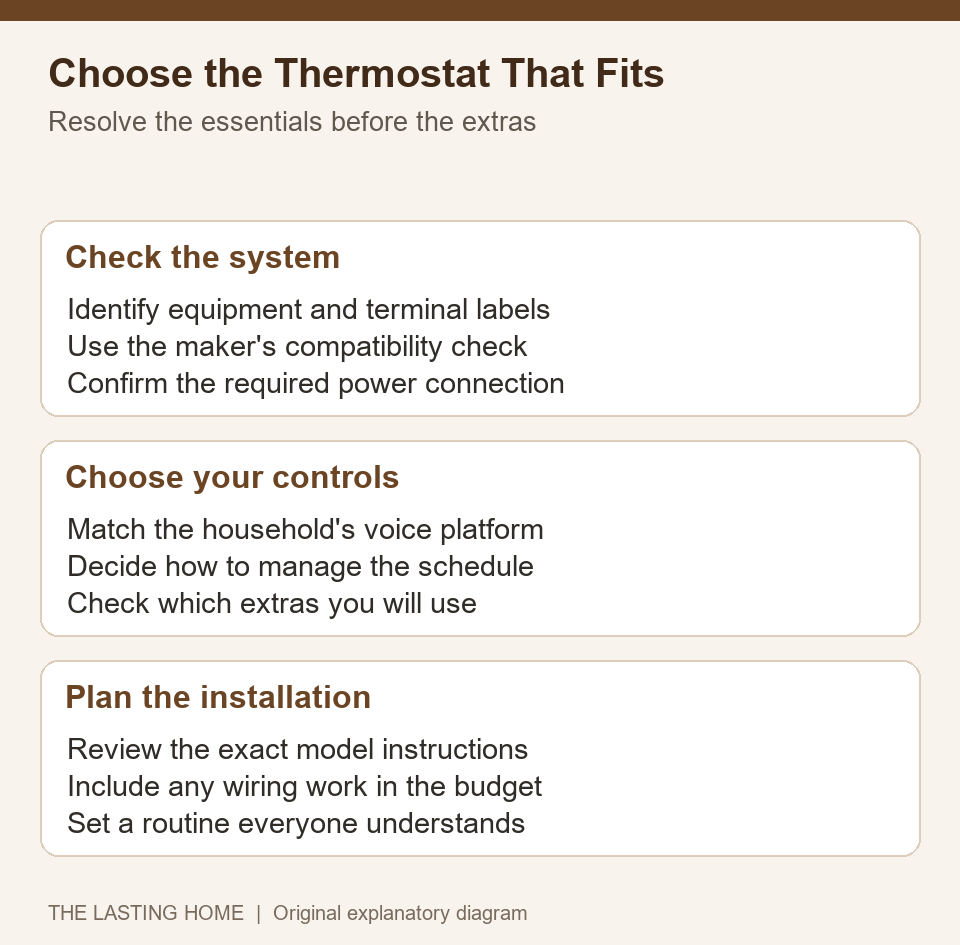
Choose the thermostat around three decisions: whether it supports your equipment, how the household will control it, and which features earn their cost. Taking those questions in order makes the shortlist much easier to narrow.
A thermostat is easier to choose when equipment compatibility comes first, followed by everyday controls and a realistic installation plan.
Start with the heating and cooling system
Record the equipment type and the functions the existing thermostat controls. Heating, cooling, auxiliary heat, and additional equipment can create different requirements. If you have a complex system, ask the equipment manufacturer or an HVAC professional which controls must be preserved.
Do not choose by the number of visible wires alone. Use the thermostat manufacturer’s compatibility process and keep a clear record of the existing terminal labels. A positive compatibility result is more useful than a broad statement that a thermostat works with most homes.
Choose a routine people can live with
A schedule should reflect the household as a whole. An empty home on weekdays calls for different settings from one occupied by a remote worker or someone with an irregular shift. Decide who can change the settings and how temporary changes should fit into the routine.
When comparing automation features, distinguish programming from learning and location-based control. These terms describe different approaches. Confirm the particular function you want rather than assuming every smart thermostat automatically learns when everyone is home.
Decide whether extra sensing helps
An additional sensor can be useful when the thermostat’s location does not reflect the space you care about. Consider where it would go and how the thermostat uses its information. A sensor also cannot remove the need to address a persistent equipment or airflow problem.
Similarly, buy an environmental monitor because you want the information it provides. Check what it measures and how the manufacturer says to interpret the results. A long feature list is useful only when the features answer a real household need.
Read reports with the right question in mind
When comparing reporting features, ask what information you want to learn. A record of equipment runtime can help you see when heating or cooling is active. It is different from a direct measurement of household energy consumption, and a shorter runtime does not translate into a fixed amount off the bill. Weather, equipment, and energy rates all affect that comparison.
Look for information you can use to make a decision: whether a schedule matches occupancy, for example, or whether a temporary setting stayed in place longer than intended. Choose reporting features for those practical questions rather than expecting the thermostat to explain every change in your utility bill.
Set realistic expectations for savings
ENERGY STAR explains its smart-thermostat certification as a process grounded in real-world energy-use data. That makes certification a useful shopping criterion. It does not establish a guaranteed saving for an individual home.
Compare total installation cost, useful features, and any available rebate requirements. If your previous thermostat already followed an effective schedule, your reasons to upgrade may center on convenience. Review the new settings after installation so that added control translates into a routine you actually want.
Compare the complete purchase
Make a simple budget with the thermostat, any required power accessory, installation work, and optional devices you actually intend to add. Ask which items are included in the package before comparing offers. A cheaper wall unit can become the more expensive project when the wiring needs work, while a fuller package can be good value if you would otherwise buy its useful extras separately.
What Else Do Smart Thermostats Work With?
Start with the control platform the household already uses. Essential, Enhanced, and Premium explicitly identify several voice platforms in these selections. Amazon’s thermostat fits an Alexa and Ring plan, while the two Sensi selections explicitly identify Alexa. Verify any additional integration you require before buying.
Distinguish support for a voice assistant from having an assistant built into the thermostat. Also check whether an integration requires another device, an account connection, or particular app settings. That distinction matters when planning how someone will change the temperature from another room.
Connectivity deserves a place in the decision, too. Check Wi-Fi coverage at the thermostat’s location and review what functions remain available when the internet connection drops. ENERGY STAR’s product criteria require certified models to function as basic thermostats without connectivity to the service provider. Remote features still need their intended connection.
Can You Install a Smart Thermostat Yourself?
Some replacements suit a prepared DIY homeowner, while others need professional help. The deciding factors are the equipment, wiring, manufacturer’s instructions, and your ability to follow them accurately.
Before handling wires, turn off power to the heating and cooling equipment using the manufacturer’s procedure. Photograph the existing connections clearly enough to read the terminal labels, then follow the model-specific instructions. Sensi’s installation guide calls for powering down, recording the old wiring, checking its configuration, and labeling wires before removing the base.
Resolve power requirements early. The Amazon selection explicitly requires a C-wire. Requirements for the other models must be checked for your equipment; do not assume that an adapter or wiring approach suitable for one thermostat applies to another.
Arrange professional help if the compatibility check is unclear, the wiring does not match the instructions, or specialized equipment is involved. Avoid making guessed connections to complete an installation. Include the cost of any approved wiring work when comparing the options.
If you arrange installation, share the equipment details and wiring photograph ahead of time. Ask the installer to explain the chosen configuration and show you how to make a temporary temperature change. Keep that information with the thermostat instructions so that another household member can understand the setup later.
After installation, check normal heating and cooling operation according to the instructions, establish the household routine, and make sure everyone knows how to change the temperature. The best purchase is a compatible thermostat whose controls and settings remain useful after the novelty wears off.






Write Your Review
No reviews yet. Be the first to share your experience!