

> Editorial Note: I’m Olivia Bennett, a storage and organization contributor. I approach storage as a systems problem rather than a product one — fit to actual room dimensions, load ratings, and how the system holds up under daily use.
A label maker is the cheapest fix for a pantry that never stays sorted. Once your flour bin, your spice jars, and your kid’s bathroom basket all read the same way, the system holds because everyone can see where things go. That’s the whole point. Labels turn a one-time tidy into a habit that survives a busy week. If you’re rebuilding a storage system from the ground up, pair your labeler with a best pantry organizer, a set of best storage baskets, a best drawer organizer, a best spice rack, and proper best closet shelving. Below are five label makers I’d put on a shortlist, sorted by how you actually use them at home.
How We Evaluated
I sorted these by type first: keyboard tape units, thermal sticker printers, and dedicated shipping printers each solve a different problem. Connectivity matters next. Standalone keyboards work without a phone, while Bluetooth-and-app models unlock more fonts and icons. Inkless thermal printers skip cartridges entirely, but the print can fade in heat or direct sun, so I weighed label durability against convenience. I also checked font and icon libraries, tape widths from 0.5 inches up, label cost over time, and whether each fit a home organization job versus a business or shipping workload. Ratings are noted where reviewers backed them up.


Brother P-Touch PT-D210 Label Maker Bundle with 4 TZe Laminated Tapes, 14 Fonts, 600+ Symbols, White
Pros
- Four laminated tape rolls included in the bundle offer excellent out-of-box value compared to buying the machine alone.
- Laminated TZe tapes are water-resistant, fade-resistant, and dishwasher-safe, so labels last in high-use areas like kitchens and laundry rooms.
- Live label preview on the display lets you see exactly how the label looks before printing, reducing wasted tape.
- Wide range of fonts, frames, and symbols makes it genuinely fun and flexible for both functional and decorative labeling projects.
- Highly rated by nearly 4,000 reviewers, indicating consistent real-world performance and reliability.
Cons
- Batteries are not included and six AAA batteries drain faster than expected with heavy use, so an AC adapter purchase adds to the total cost.
- The bundle only includes black-on-white tape, so anyone wanting colored or specialty tape for aesthetic labeling needs to buy those separately.
- The keyboard layout is small and the device lacks Bluetooth or app connectivity, which may feel limiting if you want to design labels from your phone.
There is a certain satisfaction in opening a pantry or closet that is properly labeled, and the Brother PT-D210 makes getting there genuinely easy. The bundle comes with four tape rolls ready to go, which means you are not stopping after the first ten minutes to order supplies. The device feels solid in hand, the keyboard is intuitive, and the display preview removes all the guesswork from label formatting.
What sets this machine apart for home use is the durability of the laminated TZe tapes. Whether you are tagging spice jars that get wiped down regularly, labeling freezer bins, or organizing a kids' playroom shelf, these labels do not peel, fade, or bubble. The design options, including 14 fonts, 98 frames, and over 600 symbols, are generous enough that your labels can match the aesthetic of your space rather than clash with it.
It fits naturally into a home organizing routine whether you use it weekly or pull it out for a big seasonal sort. If you want clearly organized spaces that actually stay organized without spending hours fighting a complicated device, this one delivers.
Styles it works with: Modern Farmhouse, Minimalist, Scandinavian, Transitional
Best placed in: Kitchen pantry or cabinet shelf, home office desk drawer, garage or utility room storage area
May not suit: Households looking for a purely decorative aesthetic label solution may find the included black-on-white tape too utilitarian without purchasing additional colored or specialty tapes separately. Very small apartments with no dedicated storage or organization zones may not get enough daily use to justify the counter or drawer space.
Buy it if:
- You are tackling a home organization project and want a reliable, all-in-one kit that works right away without sourcing extra supplies.
- You need labels that hold up in the kitchen, laundry room, or garage where moisture and handling are regular factors.
- You want enough font, frame, and symbol options to create labels that look styled and intentional rather than plain and functional.
Consider waiting if:
- You have a specific colored tape aesthetic in mind, such as gold, clear, or pastel, and want to confirm those tape styles are available and in stock before committing to the machine.
Skip it if:
- You primarily want to design labels from a smartphone app or need Bluetooth connectivity, as this model is keyboard-only with no wireless features.
- You need a heavy-duty commercial labeling solution with wide-format tape options beyond 12mm.
Check the latest price and availability on Amazon before it sells out.

SUPVAN E11 Bluetooth Label Maker with Keyboard & App, 30+ Fonts, 660+ Icons, Rechargeable, 4 Tapes Included
Pros
- Dual printing modes (keyboard and Bluetooth app) offer real flexibility for both quick and detailed label jobs
- Generous app customization with 660+ icons, 50+ frames, and 30+ fonts is entirely free with no subscription
- Four tape rolls included at launch represents strong out-of-box value for the $30 price point
- Rechargeable battery with up to one month of use per charge is a clear upgrade over AA-battery competitors
- Minimal margin printing at 0.2 inches noticeably reduces tape waste compared to standard label makers
Cons
- No reviews yet at launch, so real-world durability and app reliability are still unverified by buyers
- Tape width is limited to 0.59 inches, which may be too narrow for large bin labels or industrial-style organization
- Bluetooth dependency for app features means label-making slows down if your phone battery is low or pairing is interrupted
There is something genuinely satisfying about opening your pantry or filing cabinet and seeing every container, folder, and bin labeled in a consistent, clean font. The SUPVAN E11 makes that level of organization achievable without a steep learning curve or a hefty price tag. The built-in keyboard means you can dash off a quick label in seconds, while the Bluetooth app unlocks a surprisingly deep library of fonts, icons, and frames for the times you want your labels to actually look good.
What sets this machine apart from the sea of budget label makers is the combination of a rechargeable battery and genuinely minimal margin printing. You are not burning through AA batteries every few weeks, and you are not wasting half a tape roll on oversized borders. The result is a tool that is both cost-efficient and satisfying to use regularly. The compact footprint means it earns a permanent spot in a kitchen drawer rather than getting shoved to the back of a closet.
For home decor shoppers who care about the details, the 660+ icons and 50+ frames mean your labels can complement your interior aesthetic rather than fight it. Whether you favor a clean minimalist look or something more playful, the free app gives you enough creative control to make it work. If you want beautifully organized spaces without paying a premium for a name-brand label maker, this one delivers.
Styles it works with: Minimalist, Modern Farmhouse, Scandinavian, Contemporary
Best placed in: Kitchen pantry and cabinet shelves, home office desk or filing area, garage and craft room storage bins
May not suit: Buyers who need wide-format labels for large storage containers or deep shelf bins, as the 0.59-inch tape width limits label size; households that prefer a fully analog setup without relying on a smartphone app for advanced features
Buy it if:
- You are organizing a kitchen pantry, home office, or craft room and want labels that look intentional rather than slapped on
- You want a rechargeable label maker under $30 that works standalone without always needing your phone nearby
- You enjoy customizing the look of your home and want a free app with real font and icon variety to match your decor style
Consider waiting if:
- You prefer to read verified buyer reviews before purchasing a newly launched product, since real-world feedback is not yet available
Skip it if:
- You need labels wider than 0.59 inches for large storage totes, bins, or warehouse-style shelving
- You need a label maker with no Bluetooth or smartphone requirement at all, such as for a shared workspace without personal devices
Check the latest price and availability on Amazon before it sells out.
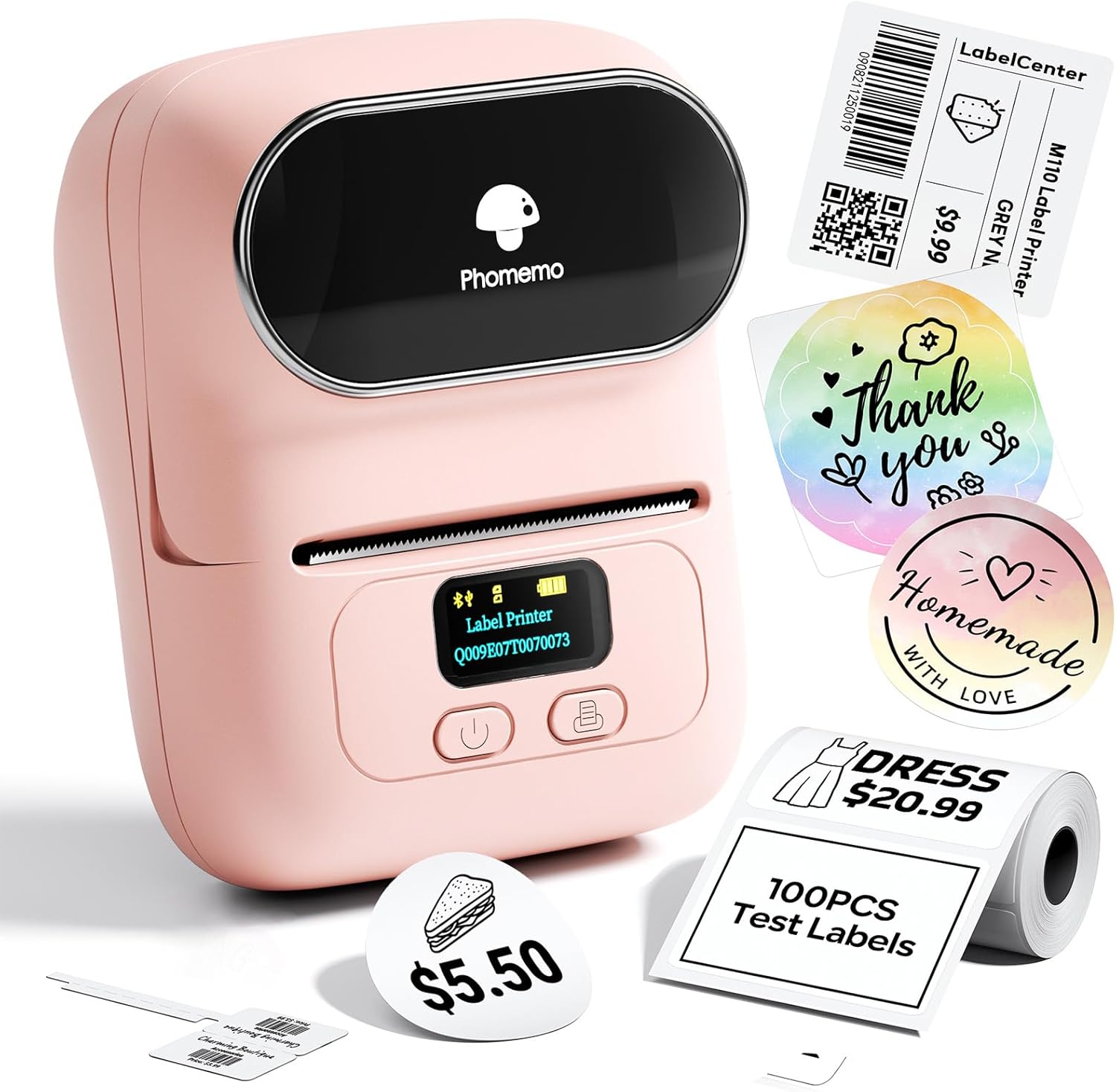
Phomemo M110 Bluetooth Thermal Label Printer - Mini Pink Label Maker for Home, Office & Small Business
Pros
- Genuinely compact and lightweight, easy to store or carry to different rooms
- Stable Bluetooth connection with a 33-foot range that rarely drops mid-print
- App is intuitive with a large free template library covering most home and office labeling needs
- Clear electronic display shows battery level and pairing status at a glance
- Highly rated by over 6500 buyers, with consistent praise for print quality and ease of setup
Cons
- Does not support color printing, so all labels print in black only regardless of label paper color
- Cannot print shipping labels, limiting its usefulness for high-volume e-commerce sellers
- Some premium app templates, icons, and fonts require a paid membership to unlock
The Phomemo M110 is one of those small purchases that quietly improves daily life in a dozen little ways. Whether you are finally tackling the pantry, organizing a home office, or adding polished hang tags to handmade goods, this printer delivers clean, professional results in seconds. The pink design is genuinely cute sitting on a desk or shelf, which matters when your workspace doubles as a styled room.
What sets it apart from basic label makers is the app. With over 3000 templates and an OCR feature that converts photographed text into editable labels, it handles everything from custom address stickers to clothing tags without any design experience required. The Bluetooth pairing is fast and reliable, which means you actually use it instead of leaving it in a junk drawer.
If you want professional-looking labels throughout your home without investing in a bulky, expensive machine, this one delivers.
Styles it works with: Modern Farmhouse, Minimalist, Scandinavian, Cottagecore
Best placed in: Kitchen pantry or countertop for food storage labeling, home office desk for file and cable organization, craft or hobby room shelf for supply containers
May not suit: Households that need full-color decorative labels for aesthetic-forward projects, or users who primarily need large shipping labels for an e-commerce operation
Buy it if:
- You are organizing your pantry, closet, or home office and want neat printed labels instead of handwritten ones
- You run a small business or sell handmade items and need professional-looking price tags, clothing labels, or barcodes on a budget
- You want a label printer that works directly from your smartphone without needing a dedicated computer setup
Consider waiting if:
- You prefer a color other than pink and want to check if additional colorways become available
Skip it if:
- You need to print shipping labels for packages, as this model does not support that label size or format
- You require full-color label printing for product packaging or high-design branding purposes
Check the latest price and availability on Amazon before it sells out.

Pros
- Wireless Bluetooth printing from phone or tablet makes it genuinely convenient for room-to-room home organizing
- No ink or toner needed thanks to direct thermal technology, which keeps ongoing costs low
- Generous app library with 6,000 icons and 300 fonts gives real creative flexibility for custom label designs
- Ultra-portable at 0.6 lbs with strong battery life rated for up to 4,200 labels per charge
- Supports barcodes, QR codes, and address labels, making it useful for both home and small business use
Cons
- No customer reviews available yet, so real-world reliability and print quality cannot be confirmed by buyers
- Requires downloading a separate app (Print Master for mobile, Labelife for PC), which adds setup steps and depends on continued app support
- Printing speed of 20mm/s and 203 DPI resolution is standard but not exceptional compared to higher-end label printers in the same price range
The Ponek M100 punches above its weight as a home organization tool. Most label makers feel like office equipment that was dragged into the kitchen, but the M100 gives you enough design flexibility, 300 fonts, 6,000 icons, and full barcode support, to create labels that actually look intentional rather than slapped on. Whether you are labeling pantry jars in a Farmhouse kitchen or color-coding storage bins in a home office, the app lets you match the label to the space.
The portability factor is real. At just 0.6 lbs and with Bluetooth connectivity, you are not tethered to a desk. You can walk room to room, print as you sort, and knock out an entire home organization project in one session. The 4,200-label battery life means you will not be stopping to recharge halfway through a garage cleanout or a small market event.
If you want a wireless, ink-free label printer that handles both everyday home organizing and small business tasks without locking you into a subscription, this one delivers.
Styles it works with: Modern Farmhouse, Minimalist, Scandinavian, Contemporary Home Office
Best placed in: Kitchen pantry or countertop for food storage labeling, home office desk for file and supply organization, craft room or workshop for inventory and material tagging
May not suit: Households looking for a purely decorative item since this is a functional tool with a utilitarian form factor; renters or users who only need to label a handful of items and would find the app setup more effort than it is worth
Buy it if:
- You are tackling a full home organization project and need to label pantry items, storage bins, folders, and containers across multiple rooms in one go
- You run a small business and need a portable way to print barcodes, QR codes, or address labels without investing in a bulky commercial printer
- You want creative control over label design and like the idea of choosing from hundreds of fonts and icons to match your home aesthetic
Consider waiting if:
- You prefer to buy products with an established review history before committing, since the M100 currently has no customer ratings to reference
Skip it if:
- You only need to label a few items occasionally and would rather use a simple handheld tape label maker without app dependency
- You need color label printing, since the M100 uses thermal technology and prints in black only
Check the latest price and availability on Amazon before it sells out.

Pros
- Truly inkless thermal technology eliminates recurring supply costs
- Broad platform compatibility including Bluetooth for mobile and USB for desktop covers virtually every workflow
- Fast 150mm/s print speed handles high-volume shipping days without bottlenecks
- Free Labelife software includes templates, barcode/QR support, and PDF import with no subscription required
Cons
- Bluetooth connection requires the Labelife app -- devices cannot pair directly, which adds a step compared to some competitors
- Black-and-white printing only; color labels require purchasing separate compatible thermal color paper
- No onboard reviews available yet, so long-term durability and real-world reliability are still unproven
The Phomemo 241BT earns its place on any home office desk by doing one thing exceptionally well: printing clean, professional shipping labels fast, with zero ink costs. For anyone running a side hustle on Etsy or Shopify, or simply mailing packages regularly, the math on inkless thermal printing adds up quickly -- no cartridges to replace, no dried-out ink heads to unclog, just consistent results every time you hit print.
What sets it apart from similar printers in this price range is the folded-paper compartment design. Instead of wrestling with a roll of labels that unspools across your desk, you load neatly stacked fan-fold sheets that sit inside the compact housing. It keeps your workspace tidy and cuts down on the mid-batch paper changes that interrupt a busy shipping day.
The Labelife app is genuinely user-friendly -- no account creation, no paywall, just a clean interface with templates and PDF import ready to go. If you want professional-quality shipping labels at home without the hassle of ink subscriptions or clunky software, this one delivers.
Styles it works with: Modern Minimalist, Scandinavian, Industrial Home Office, Contemporary
Best placed in: Home office desk setup, kitchen counter packing station, garage or utility room shipping area
May not suit: Very small desks with no room for a dedicated printer footprint; households that only ship packages occasionally and cannot justify a dedicated label printer over printing on standard paper
Buy it if:
- You sell on eBay, Etsy, Amazon, or Shopify and ship multiple orders per week and want to stop wasting ink on a regular printer
- You run a small home-based business -- food labeling, handmade goods, clothing -- and need a versatile label solution that works from your phone
- You already use Bluetooth for most of your home office setup and want a wireless printer that connects to your iPhone or Android without a laptop nearby
Consider waiting if:
- You want verified customer reviews before committing -- this listing currently has no ratings, so waiting a few months for real-world feedback is a reasonable approach
Skip it if:
- You need full-color label printing as a core requirement -- this printer is black and white only by default
- You prefer direct Bluetooth pairing without a third-party app, as the 241BT requires the Labelife app for all wireless connections
Check the latest price and availability on Amazon before it sells out.
1. Brother P-Touch PTD210 — Best Traditional Overall
If you want one labeler that just works without an app, this is it. The Brother P-Touch PTD210 is a classic keyboard unit: type on physical keys, preview on the screen, peel and stick. It earns a 4.6 rating, and the bundle ships with 4 label tapes so you’re not buying refills on day one. The laminated TZe tapes are the real draw here. They’re rated to resist water, fading, and abrasion, which is why they hold up on a spice jar that gets handled daily or a bin that lives in a humid basement. You’re not getting Bluetooth or icons, and the tape isn’t the cheapest per foot. But for a homeowner who wants durable labels with zero setup, that trade is easy. It does the pantry, the cables behind the TV, the kids’ storage cubbies. Good Housekeeping has long pointed to P-Touch tape durability, and that reputation holds. Set it on the counter, type, done.
2. SUPVAN E11 Bluetooth Label Maker — Best Hybrid/Feature-Rich
The SUPVAN E11 is the one to grab if you can’t decide between a keyboard and an app. It’s both. You get physical keys for quick jobs and a Bluetooth app for the heavy design work, which is rare at this price. It carries a 4.6 rating and ships with 4 tapes. The app unlocks 30+ fonts and 660+ icons, so a plain “Sugar” label can pick up a little jar graphic without much fuss. Here’s the part organizers like: it’s rechargeable and inkless, so there’s no cartridge to track, just tape. That keeps running cost lower than a traditional ink-style setup. The downside is mild. Leaning on the app means a dead phone slows you down, though the keyboard covers you in a pinch. For a whole-house labeling project where you want variety in look without buying two devices, the E11 is the most flexible pick on this list. It’s the closest thing here to a do-everything tool.

3. Phomemo M110 Thermal Printer — Best for Sticker Labels
The Phomemo M110 isn’t a keyboard labeler at all. It’s a thermal sticker printer that pairs to your phone over Bluetooth and prints peel-off labels in batches. That difference matters. When you’re labeling 40 storage bins in one sitting, designing on a phone and printing a stack beats typing each one by hand. It’s inkless thermal, so there’s no cartridge, just rolls of die-cut or continuous label stock. The 4.4 rating reflects a small learning curve with roll loading, but once it’s set up the workflow is fast. The honest caveat with any thermal print: it can fade under direct sun or sustained heat, so I’d keep M110 labels on indoor bins, closet shelves, and pantry containers rather than a sunny windowsill. It’s marketed for small business and home, and for an organization project with lots of identical-format labels, it’s the efficient choice. Different tool than the Brother, different job.
4. Ponek M100 App Label Maker — Best App/Icon Variety
The Ponek M100 leans hardest into the app experience, and its library is the headline. You get access to 6000 icons and 300 fonts, which dwarfs what the keyboard units offer. If your labeling style runs visual, say a coffee cup on the coffee bin or a sock icon on the drawer, this is the deepest well here. It’s portable and inkless, pairing to a phone the same way the Phomemo does, so there’s no cartridge to replace. The rating is more modest than the Brother or SUPVAN, and that tracks with app-dependent devices: the hardware is simple, and your experience rises and falls with the software. There’s no physical keyboard fallback, so a phone is required every time. But for someone furnishing a kid’s room or a craft closet where icons do the heavy lifting, the M100’s library earns its spot. It’s a specialist, not a generalist.
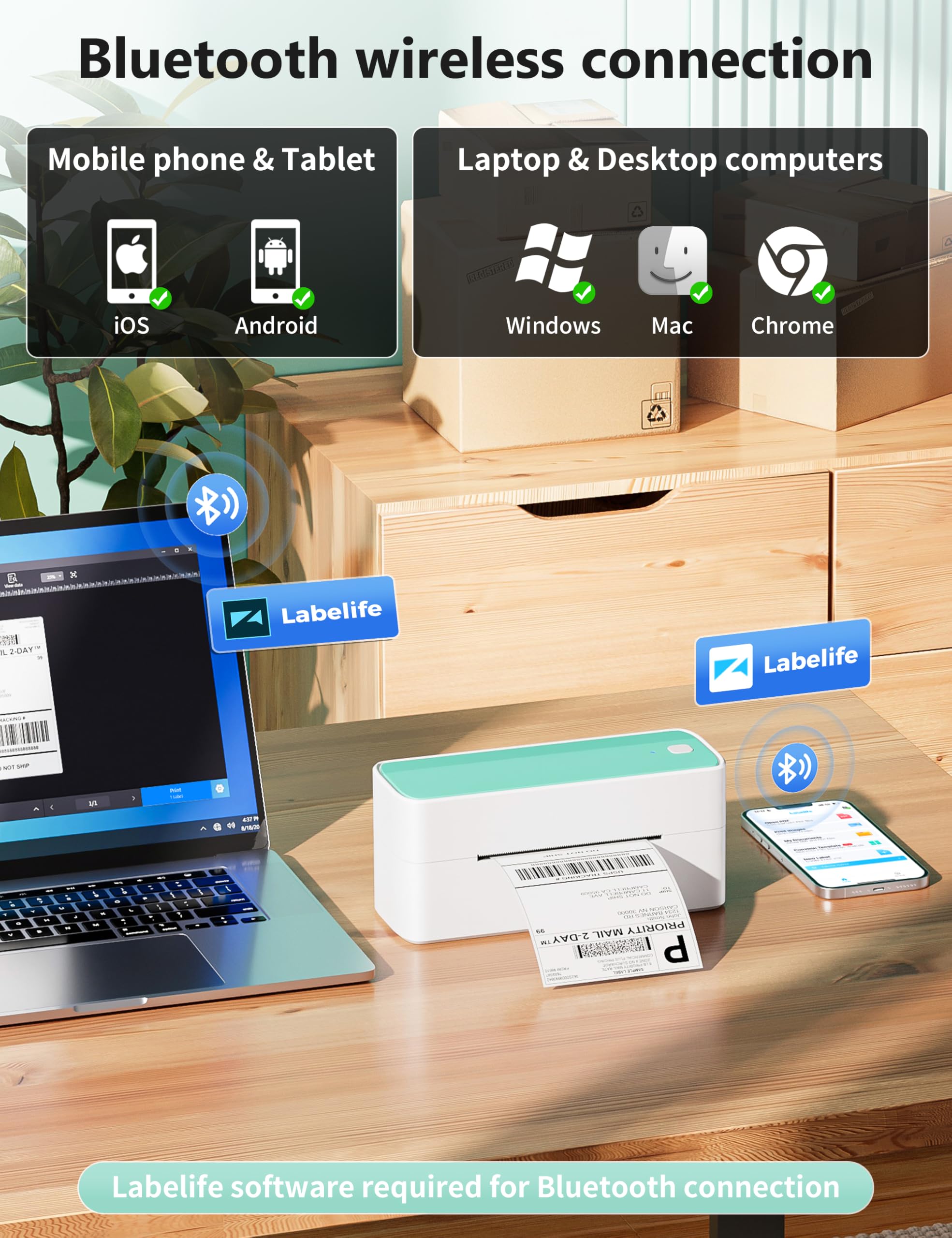
5. Phomemo 241BT Shipping Printer — Best for Shipping
The Phomemo 241BT is the outlier, and on purpose. It’s a Bluetooth thermal printer built for 4×6 shipping labels, not pantry tags. Those labels run a full 6 inches long. If you run an online shop out of a spare room, sell on resale apps, or just ship a lot, this is the one that belongs on the desk. It’s wireless and inkless, printing standard shipping label stock without toner or a cartridge. The rating sits in the modest range, again reflecting setup quirks common to thermal units, but the core job — clean, fast 4×6 labels — it handles well. I’m including it because home organization and a home business often share the same room, and people ask. Just don’t buy it for spice jars; the label format is too big. Pair it with one of the smaller printers above if you need both. Right tool, right label size. That’s the rule.
Comparison Table
| Pick | Type | Connectivity | Inkless | Rating |
|---|---|---|---|---|
| Brother P-Touch PTD210 | Keyboard tape | Standalone | No (tape) | 4.6 |
| SUPVAN E11 | Keyboard + thermal | Keyboard + Bluetooth app | Yes | 4.6 |
| Phomemo M110 | Thermal sticker | Bluetooth app | Yes | 4.4 |
| Ponek M100 | Thermal sticker | Bluetooth app | Yes | Modest |
| Phomemo 241BT | Shipping thermal | Bluetooth wireless | Yes | Modest |
How to Choose a Label Maker (Type, Connectivity & Labels)
Start with type, because it decides everything else. A keyboard tape unit like the Brother is self-contained: no phone, durable laminated tape, ideal for labels that take handling and humidity. A thermal sticker printer skips cartridges and prints fast batches from a phone, which suits a big bin-labeling project. A shipping printer is a separate category entirely, sized for 4×6 labels. Next, connectivity: standalone keyboards win on speed and reliability for quick one-off labels, while Bluetooth-and-app models trade that for bigger font and icon libraries, like the Ponek’s 6000 icons and 300 fonts. Inkless thermal printers cut running cost since there’s no cartridge, but watch label durability: thermal print fades in heat and direct sun, so keep those labels indoors. Tape units cost more per foot but the laminated print lasts for years. Consumer Reports notes that running cost, not sticker price, often decides long-term value. Match the device to where the label lives.
Tape vs. Thermal Label Makers
The real fork is tape versus thermal. Tape label makers, like the Brother, print onto laminated adhesive tape that resists water, abrasion, and UV. That’s why tape suits high-touch and damp spots like bathroom bins, basement shelves, anything in a window. The cost is convenience and price: you buy cartridges, and per foot it’s pricier. Thermal printers use heat-sensitive label stock with no ink at all, so the running cost drops and batch printing is quick. The catch is longevity. Thermal labels can fade under sustained heat or direct sunlight, sometimes within 6 months in a harsh spot. For most indoor organization, think pantry, closet, playroom, thermal holds up fine and saves money. For demanding environments, tape’s durability wins. Many organized homes end up with both.
Frequently Asked Questions
What’s the best label maker for home organization?
For most homes, the Brother P-Touch PTD210 is the safest pick. It’s a standalone keyboard unit with durable laminated tape, so it handles pantry jars, closet bins, and cable tags without an app. If you want more fonts and icons for a decorative look, the SUPVAN E11 adds Bluetooth and app design while keeping a keyboard.
Tape or thermal label maker?
Tape units print on laminated adhesive that resists water and fading, so they’re best for damp or high-touch spots. Thermal printers are inkless and cheaper to run, great for batch-labeling lots of indoor bins. Pick tape for durability, thermal for volume and lower cost.
Do thermal labels fade over time?
They can. Thermal print is heat-sensitive, so direct sun or sustained warmth can cause fading, sometimes within months in a harsh location. Kept on indoor shelves, pantries, and closets, thermal labels hold up well for a long time. For windowsills or hot spots, laminated tape lasts longer.
Are app-based label makers better than keyboard ones?
Neither is strictly better. They solve different jobs. App models like the Ponek M100 offer huge font and icon libraries and fast batch printing, but you need your phone every time. Keyboard units are quicker for one-off labels and don’t depend on a charged phone. The SUPVAN E11 splits the difference with both.
Can a label maker print shipping labels?
A standard organization label maker can’t; the labels are too narrow. For 4×6 shipping labels you want a dedicated thermal shipping printer like the Phomemo 241BT, which prints inkless wireless labels at the right size. Keep a smaller printer for household labels.
Do label makers need ink?
Thermal models don’t. The Phomemo M110, Ponek M100, and 241BT all print inkless using heat-sensitive label stock, so there’s no cartridge to buy. Tape units like the Brother don’t use ink either, but they do need replacement tape cartridges, which is their main running cost.
Bottom Line
Buy by the job, not the spec sheet. For durable everyday labeling that survives humidity and handling, the Brother P-Touch PTD210 is the dependable default. Want app design and a keyboard in one? The SUPVAN E11. For batch-printing dozens of indoor bin labels, the inkless Phomemo M110. The Ponek M100 wins on icon variety, and the Phomemo 241BT is the one to grab only if you’re printing shipping labels. Match the tool to where the label lives and you’re set.
Write Your Review
No reviews yet. Be the first to share your experience!