

> Editorial Note: I’m Hannah Lin, an Interior Living Researcher who’s spent 9+ years analyzing the home furniture market. This guide draws on BIFMA, GREENGUARD, and FSC certifications, plus owner reviews aggregated from Wirecutter, Apartment Therapy, and the major home design subreddits.
The mistake almost everyone makes is spraying cleaner straight onto the keys, which lets liquid seep under the caps and short the board. A keyboard doesn’t need to be soaked, it needs to be dusted, wiped, and dried in the right order. If your desk setup runs alongside styled shelves and layered lighting, treat the keyboard like any other surface you actually touch every day, the same way you’d maintain best gallery wall frames, a best console table for entryway, a best large floor mirror, a best wall mirror for living room, or the base of a best table lamp for living room. Here’s the process that keeps a board clean without ruining it.
How Often Should You Actually Clean a Keyboard?
Most people wait until the keys feel sticky. That’s already too late. A light surface wipe once a week and a full debris clear-out once a month keeps grime from ever building into the gummy layer that jams keys.
The math is simple. Your hands transfer oil, skin cells, and whatever’s on your snack every single time you type. Studies cited by Wirecutter have found desk keyboards can carry more bacteria per square inch than a typical toilet seat, mostly because nobody cleans them on a schedule. That’s not a health scare, it’s a maintenance reminder.
Set two rhythms. The weekly pass is 90 seconds: unplug, flip, shake, wipe the tops. The monthly deep clean is 15 minutes: blow out debris, lift caps if needed, disinfect, and dry fully before plugging back in.
If you eat at your desk, bump the weekly wipe to twice a week. Crumbs are the number one cause of a key that suddenly stops registering. Apartment Therapy’s home-office guides make the same point: the single biggest driver of keyboard failure isn’t age, it’s trapped food and dust that people never clear.
One rule stays constant. Always power down and unplug a wired board, or switch off and remove batteries on a wireless one, before any cleaning. Moisture plus power is the fastest way to kill electronics.
The 5-Minute Surface Clean (Do This Weekly)
Start dry, always. Unplug the keyboard, turn it upside down over a trash can, and give it a firm shake. You’ll be surprised how much falls out. Loose crumbs. Hair. Dust.
Next, knock out what the shake missed. A can of compressed air or a cordless electric duster spinning at high RPM blasts particles from between the keys in seconds. Hold the nozzle at a slight angle so debris shoots sideways instead of packing deeper under the caps. Short bursts work better than one long blast.
Now wipe the tops. Dampen a microfiber cloth with a 70% isopropyl alcohol solution, wring it until it’s barely moist, and run it across the keycaps. Alcohol at 70% evaporates fast and won’t strip most keycap legends the way harsher solvents can. The cloth should never drip, ever. If you can squeeze out liquid, it’s too wet.
For the tight seams between keys, wrap the damp cloth around a cotton swab or use a soft detailing brush. Trace each row once. That’s the whole weekly clean.
Let it air-dry for two to three minutes before reconnecting. Skipping the dry step is how people fry a board that was perfectly fine 30 seconds earlier.
Deep Cleaning: When Crumbs and Grime Get Trapped
When the surface wipe stops fixing sticky keys, it’s time to go deeper. This is a monthly job at most, and it takes about 15 minutes.
Photograph your layout first. Snap a phone picture of the full keyboard so you know exactly where every keycap goes. Membrane boards and low-profile laptop keys often aren’t meant to be pulled, so check your model before prying. For those, skip the cap removal and rely on air and swabs.
On a standard mechanical board, a keycap puller lifts each cap with a gentle straight tug. Drop the caps into a bowl of warm water with a drop of dish soap, swish, and let them soak for 20 to 30 minutes. Never put the board itself in water. Only the loose caps go in.
While the caps soak, clean the exposed base. Compressed air clears the deep debris, then a barely-damp alcohol swab lifts the oily film around each switch. Work in small sections so nothing pools.
Rinse the caps, lay them on a towel, and let them dry completely, ideally a full hour or overnight. Damp caps trap moisture against the switches. Snap them back on using your photo as the map, and you’ve reset the board to near-new.
What About Mechanical vs. Membrane Keyboards?
It depends on the build, and knowing which one you own changes the whole approach. Mechanical keyboards have individual switches under removable caps, so they tolerate deep cleaning and cap-off soaking. Membrane keyboards use a single rubber-dome sheet under a fused top, so the caps usually don’t come off safely.
For membrane and most laptop keyboards, stay on the surface. Air, damp microfiber, and swabs handle 95% of the job. Prying at fused low-profile keys is the fastest route to a snapped clip and a permanently loose key.
Mechanical owners get more freedom but also more responsibility. Those exposed switches are sensitive to liquid, so the barely-damp rule matters even more. A cloth that drips can flood a switch housing and cause chatter, where one press registers as two.
Material matters too. ABS plastic keycaps develop a shine over time and can lose printed legends to strong solvents, which is why 70% isopropyl is the safe ceiling. PBT caps are tougher and take a soap soak without complaint. When you’re unsure, assume the gentler ABS approach.
The tools overlap across both types. A duster, a microfiber cloth, and a soft brush cover nearly any keyboard you’ll own. The difference is only how far you disassemble.
Helpful Picks
These three cleared owner ratings of 4.6 and up and each bundles the core trio you actually need: airflow, a screen-safe brush, and detailing swabs. Start with the first if you want cordless air power; grab either kit if you’d rather have brushes and swabs sorted in one box.
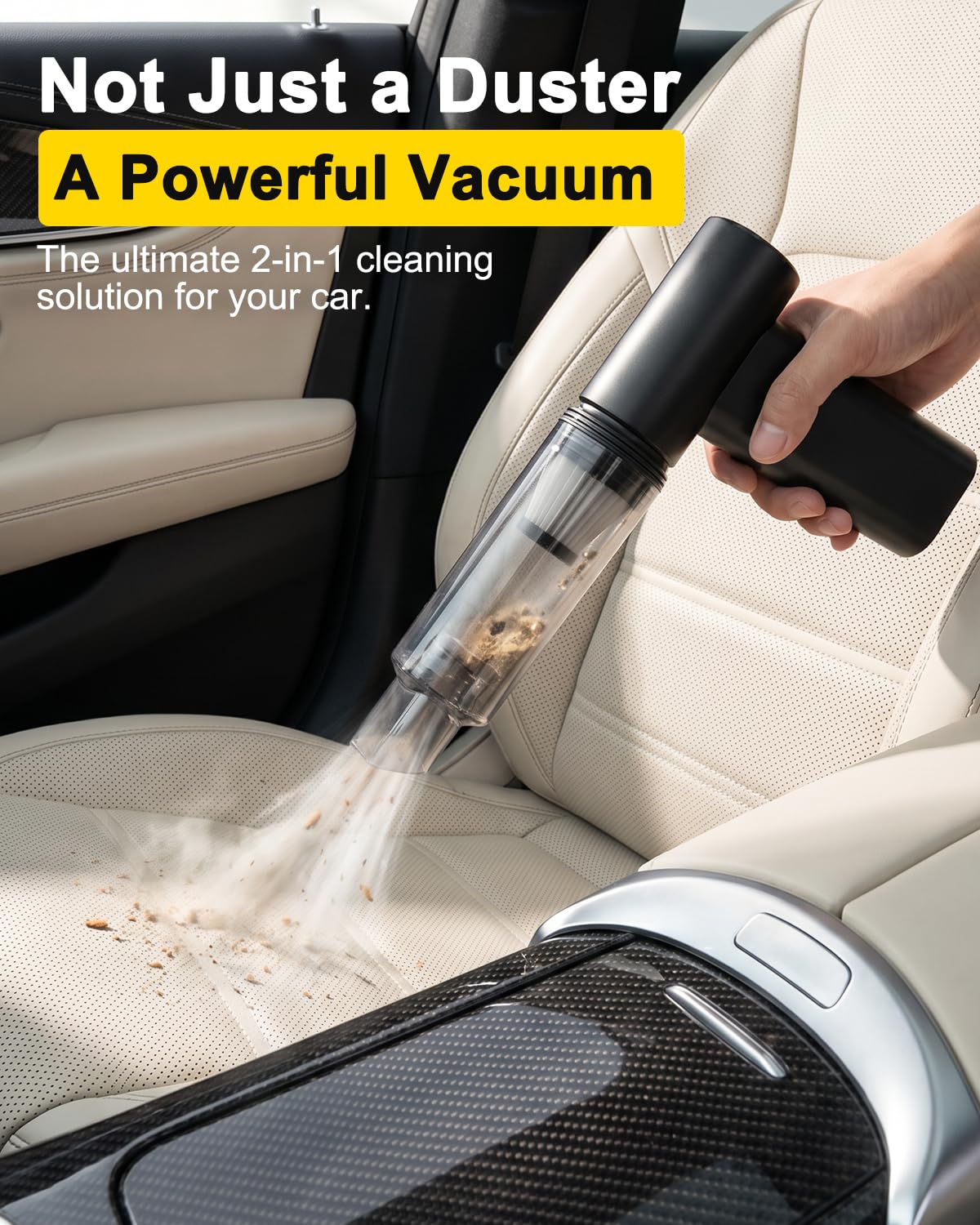

Exovyn 2-in-1 Cordless Air Duster & Mini Vacuum 160000RPM Rechargeable Keyboard PC Car Cleaner
Pros
- Dual function blower and vacuum means dust is removed, not just relocated
- Extremely lightweight and cordless for easy reach into tight spaces
- Pays for itself versus canned air within a few months
- Multiple nozzle tips handle a wide range of cleaning tasks
- Durable aluminum construction rather than cheap plastic
Cons
- Only 1 review available so long-term reliability is unproven
- Vacuum mode handles only light debris, not pet hair or heavier messes
- Runtime of 20 to 25 minutes may not be enough for larger cleaning sessions
If you have ever sprayed canned air at your keyboard only to watch the dust settle right back onto your desk, you already understand why this Exovyn tool exists. The blower mode is genuinely powerful at 160,000 RPM, and the one-click switch to vacuum means you can actually capture what you just dislodged. It is a small but satisfying upgrade to any desk or home office setup.
The aluminum body feels solid without being heavy, and the 0.66 lb weight means you can hold it at odd angles to reach behind monitors or between couch cushions without strain. It comes with five attachments that snap on quickly, so transitioning from cleaning a PC to freshening up a bookshelf takes seconds.
If you want a cleaner workspace and dust-free electronics without the recurring cost and chemical residue of canned air, this one delivers.
Styles it works with: Minimalist, Modern, Tech-Forward Home Office, Clean Aesthetic
Best placed in: Home office desk drawer, car glove box, electronics charging station
May not suit: Households neding a primary vacuum for pet hair or heavy messes; users who need more than 25 minutes of continuous runtime per session
Buy it if:
- You clean keyboards, PC components, or electronics at least once a week
- You want to stop buying canned air and reduce waste
- You need a compact cordless option for quick car interior touch-ups between full details
Consider waiting if:
- You want to see more long-term user reviews since this product currently has very few
Skip it if:
- You need serious vacuum suction for pet hair, sand, or heavy debris
- You require more than 25 minutes of uninterrupted cleaning time per charge
Check the latest price and availability on Amazon before it sells out.

Ordilend All-in-One Keyboard & Electronics Cleaning Kit with Retractable Brush, Lens Pen & Keycap Puller
Pros
- All-in-one design consolidates many tools into a single compact case
- Retractable brush is firm enough to clean between keyboard keys effectively
- 2mm polishing cloth is thicker than most competitors and absorbs stubborn stains
- Includes replaceable cloths so the kit lasts longer without repurchasing
- Works across wide range of devices from laptops to earbuds to cameras
Cons
- No liquid cleaning spray included in this version of the kit
- No verified customer reviews yet to confirm long-term durability
- Not designed for heavy-duty or wet cleaning tasks
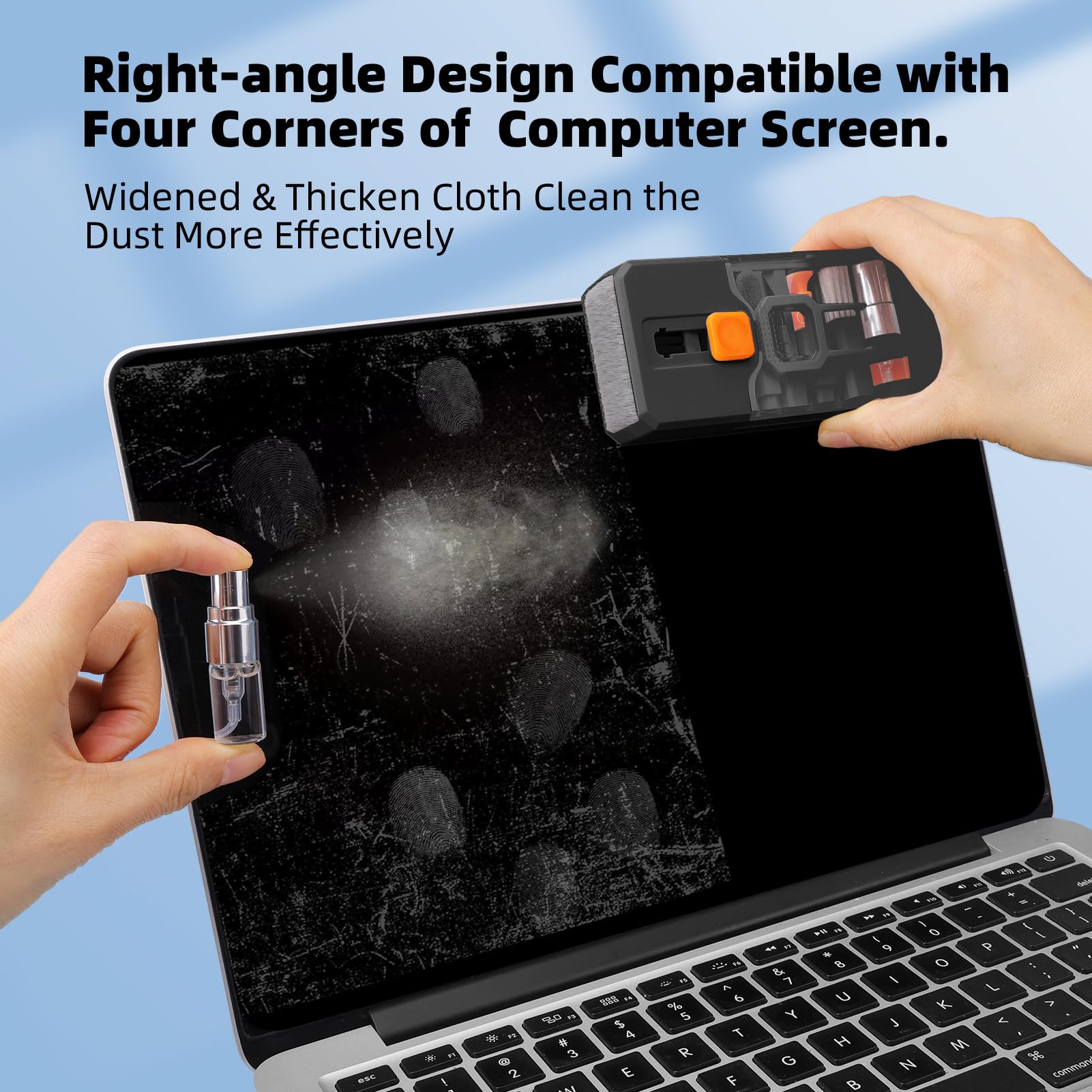
If your home office desk is anything like ours, dust and crumbs find their way into every crevice of your keyboard, and fingerprints collect on screens faster than you can wipe them. This Ordilend kit puts every tool you need into one tidy, pen-sized case that sits neatly in a desk drawer or pencil cup without adding clutter.
What stands out is how thoughtfully each tool addresses a specific annoyance. The retractable brush handles keyboard gaps, the thick polishing cloth tackles screen smudges withouthedding fibers, and the lens pen cleans your phone camera without scratching. It feels like having a professional detailing kit scaled down for everyday electronics.
If you want a single tool that keeps your entire desk setup looking fresh without clutering your workspace, this one delivers.
Styles it works with: Minimalist, Modern Home Office, Tech-Forward, Scandinavian
Best placed in: Home office desk drawer, nightstand drawer near charging station, entryway console for quick device wipe-downs
May not suit: Households looking for a decorative desk accessory, as the case is purely functional in appearance; those neding a spray-included solution for heavy screen grime
Buy it if:
- You work from home and want to keep your keyboard, monitor, and earbuds clean without buying separate products
- You own a mechanical or gaming keyboard and need a keycap puller plus brush combo
- You value compact, portable tools that do not add clutter to a tidy desk setup
Consider waiting if:
- You prefer a kit that includes a cleaning spray bottle for screen cleaning
Skip it if:
- You only need to clean one device type and would rather buy a single specialized tool
- You need heavy-duty or wet cleaning for sticky spills rather than dust and smudges
Check the latest price and availability on Amazon before it sells out.

Ordilend All-in-1 Keyboard Cleaner Kit - Portable Laptop & Electronics Cleaning Brush Set for Gamers and Professionals
Pros
- Genuinely all-in-one with brush, cloths, lens pen, sponge, metal tip, and keycap puller included
- Ultra-slim flat case (3cm thick) fits neatly in desk drawers or laptop bags
- Screen-safe, alcohol-free materials protect anti-glare and oleophobic coatings
- Replaceable polishing cloths extend usable life well beyond initial purchase
- Strong4.6 rating across 10,000+ verified reviews suggests consistent quality
Cons
- Keycap puller only works with Cherry MX-style mechanical keyboards, not laptop membrane keys
- No cleaning solution included; spray bottle sold separately
- Brush firmness is medium, which may not dislodge heavy debris from deeply neglected keyboards
A clean desk is the foundation of a space that feels put-together, and this little kit makes maintaining that efortless. The Ordilend cleaning kit tucks into a drawer or stands upright on a shelf without looking like clutter, which is more than you can say for most tech accessories. Everything clicks into a single flat case that blends with a modern workspace aesthetic.
In daily use, the retractable brush handles quick crumb sweps between meetings, and the polishing cloth removes fingerprint smudges from monitors in seconds. It turns device maintenance from annoying chore into a satisfying two-minute routine you actually stick with. The result is a desk setup that always looks ready for a video call or Instagram flat-lay.
If you want a consistently clean workspace without a clutered drawer of mismatched tools, this one delivers.
Styles it works with: Minimalist, Modern, Scandinavian, Tech-Forward Home Office
Best placed in: Home office desk drawer, nightstand drawer beside a laptop charging station, living room media console
May not suit: Households looking for a decorative desk accessory (it is purely functional), or users who need heavy-duty cleaning for workshop or garage electronics
Buy it if:
- You work from home and want your keyboard, monitor, and webcam lens clean for daily video calls
- You own a mechanical gaming keyboard and need a keycap puller plus crevice brush for deep cleaning sessions
- You travel with a laptop and want a pocket-sized kit that passes TSA without hassle
Consider waiting if:
- You prefer a kit that includes cleaning solution in the box rather than purchasing spray separately
Skip it if:
- You only use a laptop with membrane keys and have no other devices to clean (a simple microfiber cloth may suffice)
- You need industrial-strength cleaning for workshop or outdoor electronics
Check the latest price and availability on Amazon before it sells out.
Frequently Asked Questions
Can I use water to clean my keyboard?
No, not directly on the board. Water plus electronics is the fastest way to cause a short. You can soak loose keycaps from a mechanical board in soapy water, but the keyboard base only gets a barely-damp cloth, never a rinse. Dry everything fully before reconnecting.
Is rubbing alcohol safe on keycaps?
Yes, at 70% isopropyl concentration. It evaporates in seconds and won’t leave residue. Avoid higher-strength solvents, acetone, or bleach, since those can fade printed legends on ABS keycaps and cloud the plastic. Apply it to the cloth, not straight onto the keys.
How do I get crumbs out from under the keys?
It depends on how deep they’re wedged. Start by flipping the board and shaking, then hit the gaps with compressed air or a cordless duster at a sideways angle. If crumbs still won’t budge on a mechanical board, pull the affected caps with a keycap puller and clear the base underneath.
Can I remove the keys on a laptop keyboard?
Almost never safely. Laptop and low-profile membrane keys use fragile scissor clips that snap easily and often can’t be reseated. Clean those with air, a soft brush, and a barely-damp swab instead. Save cap removal for full-size mechanical boards designed for it.
How often should I clean my keyboard?
It depends on how you use it. A quick surface wipe once a week and a deep clean once a month suits most desks. If you eat while you type, wipe twice a week, since trapped food is the top cause of a dead key.
Will cleaning fix a sticky or unresponsive key?
Yes, most of the time. Sticky keys usually come from oil and debris under the cap, and clearing that resolves it. If the key still fails after a deep clean and full dry, the switch itself may be worn, which is a repair rather than a cleaning issue.
Do I need special tools or will household items work?
It depends on your goal. A microfiber cloth, 70% alcohol, cotton swabs, and a soft brush handle routine cleaning from your existing supplies. A cordless air duster and a keycap puller make deep cleans faster and safer, so a dedicated kit pays off if you clean regularly.








Write Your Review
No reviews yet. Be the first to share your experience!